Broadcast live with your software
Want to present live? Connect your broadcasting software: as soon as it transmits, it takes the place of the AutoDJ. When you stop it, the AutoDJ takes the air again.
What it is for
Going on air from your studio, your computer or an event, without interrupting your radio before or after.
Where to find it
My radio in the sidebar, then Connecting your broadcasting software on the service's page. This section is reserved for the account manager.
Step by step
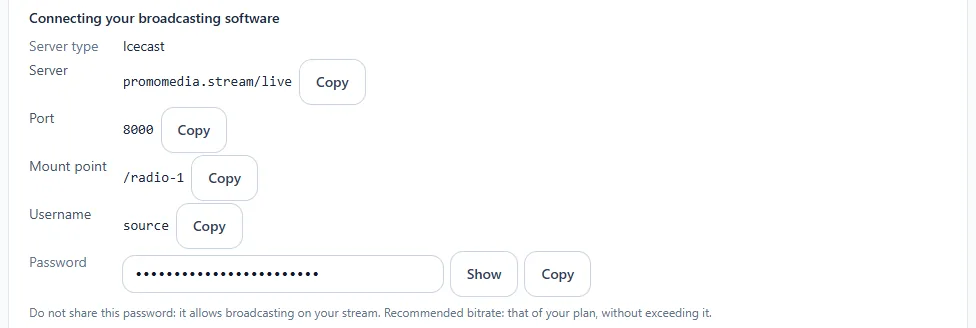
- Note the information displayed: server type (Icecast), server, port, mount point, login and password. Each value has its Copy button; the password is revealed with Show.
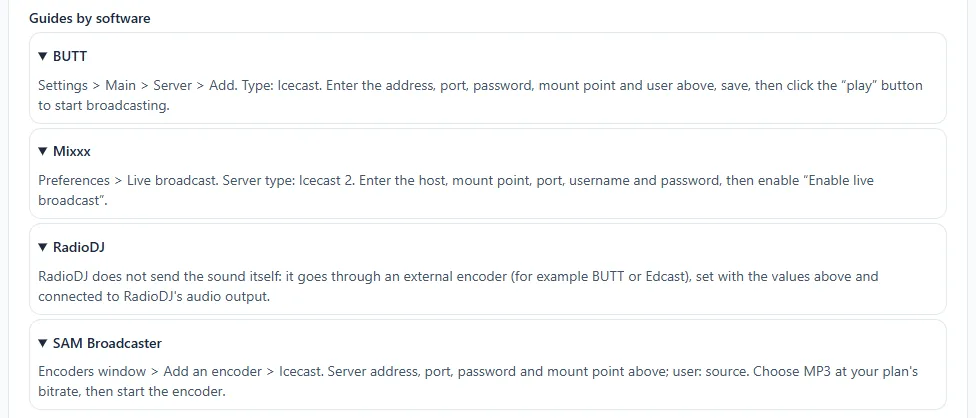
- Open your software and enter these values. A short guide is offered for each: BUTT, Mixxx, RadioDJ and SAM Broadcaster.
- Choose the MP3 format and your plan's bitrate, without exceeding it.
- Start broadcasting: your live broadcast is on air.
Keep your password to yourself
It allows broadcasting on your radio. Only share it with the people who present live.