Sound processing
The volume of each track is already levelled on upload. The station's processing then acts on the whole stream, for a uniform sound, without clipping or sudden jumps.
Where to find it
In the sidebar, under This radio, click Programming (or Program the AutoDJ from your radio's page), then, in the Advanced settings section, Sound processing.
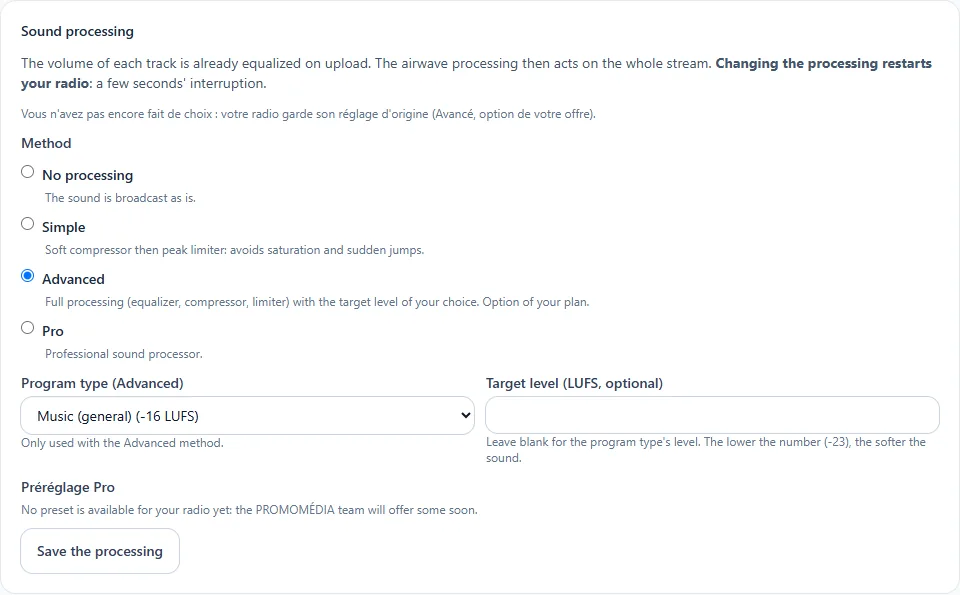
The four choices
| Method | What it brings |
|---|---|
| No processing | The sound is broadcast as is |
| Simple | Soft compressor then peak limiter: avoids clipping and sudden jumps |
| Advanced | Full processing (equaliser, compressor, limiter) with the target level of your choice |
| Pro | Professional sound processor, with a preset chosen by name |
Step by step
- Choose the method.
- With Advanced, select the programme type: Music (general), Voice (general), EBU R128, Apple Podcasts or YouTube. The target level (in LUFS) is optional: leave it empty to keep that of the programme type. The lower the number, the softer the sound.
- With Pro, choose a preset from the list.
- Click Save the processing.
A few seconds of interruption
Changing the processing restarts your radio: the broadcast is cut for a few seconds (a little longer with Advanced or Pro).
Available on request
The Advanced and Pro methods : this feature is offered on request. Open a ticket from your customer area or write to us: we will take care of it with you.