Schedule templates
Don't feel like configuring everything? A template prepares the basic programming for you.
Where to find it
In the sidebar, under This radio, click Programming (or Program the AutoDJ from your radio's page), then, in the Schedule templates section.
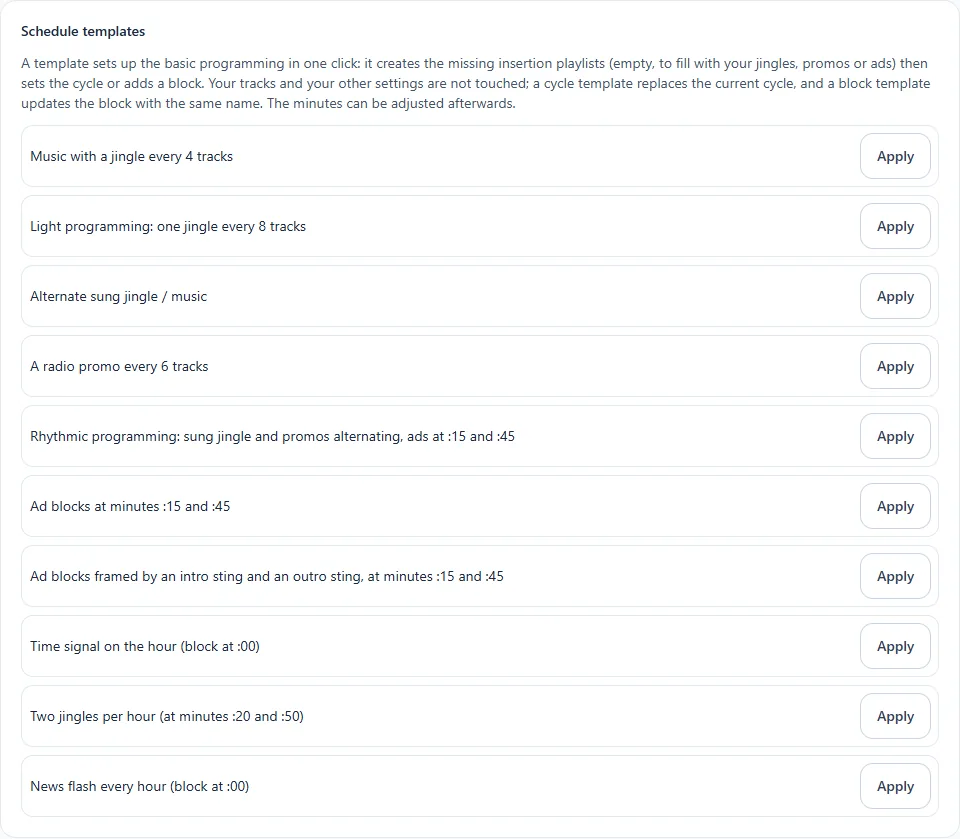
The templates offered
Two families: cycle templates (an insert comes back after a certain number of tracks) and block templates (an insert at precise minutes of the hour).
Cycle
- Music with a jingle every 4 tracks: a dynamic station.
- Light station: a jingle every 8 tracks: an airier station, with fewer interruptions.
- Sung jingle / music alternation: a sung jingle, then two tracks.
- A radio promo every 6 tracks: to announce your appointments and your events.
- Lively station: sung jingle and promos alternating, advertising at :15 and :45: a complete cycle of sung jingles and promos, with an advertising block in addition.
Block
- Advertising blocks at minutes :15 and :45
- Advertising blocks framed by an intro sting and an outro sting, at minutes :15 and :45: one sting announces the advertising, another ends it.
- Top of the hour on the dot (block at :00)
- Two jingles per hour (at minutes :20 and :50)
- News flash every hour (block at :00): on the hour, with your flashes playlist.
How it works
Click Apply next to the template. It creates the insert playlists that are missing (empty: to be filled with your jingles, promos, advertisements or flashes), then sets the cycle or adds the block. Your tracks and your other settings are not touched.
- A cycle template replaces the current cycle.
- A block template adds a block of the same name; if this block already exists, it is updated, never duplicated.
- You can apply a template several times without creating anything twice: playlists already present are reused.
Remember to fill the playlists
A template does not play any sound by itself: as long as an insert playlist is empty, its slot is skipped. Add your jingles, promos, advertisements or flashes in the library.
See the result
The Preview of the next hours section replays your rules to show you what the station would look like over 1, 2 or 4 hours. It is an example: nothing is saved and the random draw may differ from the real broadcast.
